Apple iMac (M4, 2024) Review: More Colourful Than Ever With Faster Performance
Andrew Cheng
At a glance, the new M4-powered iMac doesn’t seem all that different from last year’s M3 model. But take a closer look, and you’ll see that the latest all-in-one desktop actually has a number of small updates that make it a better machine. These include the faster M4 chip, a variety of new colours, and the option for a nano-texture glass.
Of course, even the M4 iMac’s accompanying Magic Keyboard and Magic Mouse have been updated with USB-C ports. And to sweeten the deal, the updated iMac, much like other Apple products that were recently launched, is more affordable than ever in Malaysia with a lower RM5,799 starting price.
Granted, that is still quite a bit of money for an all-in-one desktop, but I do think the 2024 iMac is money well spent…for the right user.
What It Is
Let’s start with the packaging of the iMac, which is actually pretty elaborate. Everything is well-packed and protected to survive the shipping process, and I personally appreciate the fact that the packaging material are cardboard and paper. This is in line with the Cupertino company’s green efforts.
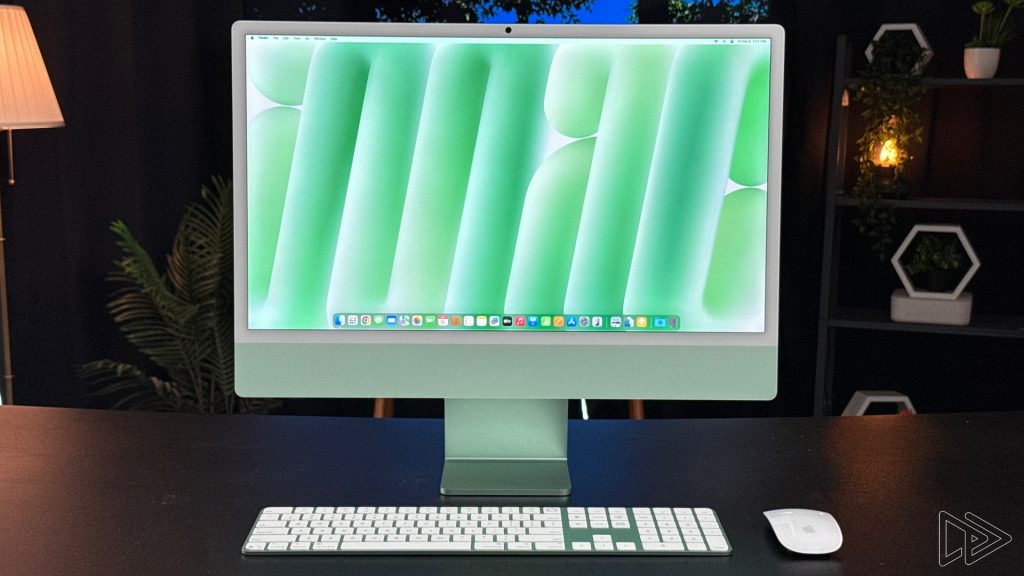
Speaking of green, I’m a fan of the iMac in this striking green colour, especially from the back. The dark green shade is not something we typically see on a Mac, though the green hue on the front of the iMac is much more muted and subdued. In my opinion, the sheer colour options available for the iMac is a great selling point.


Hardware wise, the most notable upgrade to the latest iMac is the M4 chip. The RM5,799 base model features an M4 chip with 8-core CPU and GPU, 16GB unified memory, and 256GB storage. A tier up is the RM6,699 configuration that sports the same memory and storage capacities, but it has a faster M4 chip with 10-core CPU and GPU, a Magic Keyboard with Touch ID, and support for gigabit ethernet.
This particular unit of the iMac I’m reviewing comes with the 10-core CPU and GPU M4 chip, 24GB unified memory, a 1TB SSD, the nano-texture glass option, as well as a full-size Magic keyboard, bringing the grand total to a cool RM10,199. That’s quite a bit more than the iMac’s RM5,799 starting price, though I personally think that the base model with a 1TB (or even 512GB) SSD is more than enough for most folks.
The Good Stuff
Since performance is one of the biggest upgrades to the 2024 iMac, let’s talk about that first. As mentioned, the unit I’m testing is powered by an M4 chip with 10-core CPU and GPU, and it actually compares relatively favourably to other Apple silicons in synthetic benchmarks like Geekbench 6 and Cinebench 2024.
| Geekbench 6 | iMac (M4, 10-core CPU/GPU) | MacBook Pro 14 (M3 Max) | MacBook Pro 14 (M2 Max) | MacBook Air 15 (M3) |
| CPU (multi core) | 14,761 | 21,535 | 15,208 | 12,037 |
| CPU (single core) | 3,658 | 3,233 | 2,703 | 3,124 |
| GPU (Metal) | 54,930 | 157,374 | 142,414 | 48,051 |
| GPU (OpenCL) | 36,131 | 93,911 | 82,424 | 30,595 |
| Cinebench 2024 | iMac (M4, 10-core CPU/GPU) | MacBook Pro 14 (M3 Max) | MacBook Pro 14 (M2 Max) | MacBook Air 15 (M3) |
| GPU | 4,429 | 12,886 | 6,050 | – |
| CPU (Multi Core) | 841 | 1,427 | 1,058 | 632 |
| CPU (Single Core) | 171 | 141 | 122 | 140 |
There’s only so much synthetic benchmarks can tell us, so I fired up Resident Evil 4 to see how the M4 iMac handles the game. At maxed out graphics settings in 1080p, the desktop can provide very playable frame rate, though increasing the resolution does result in choppier gameplay.
As for day-to-day use, the 2024 iMac feels as zippy as any other modern Macs I have tested over the years. Granted, my workload isn’t particularly demanding with simple video and photo editing, word processing, and web browsing. But there’s no denying that the M4 chip is very capable, as the benchmarks above show.


Beyond performance, I’d also like to touch on the new nano-texture glass of the M4 iMac; this glass option is not actually offered on the base model. Nonetheless, the nano-texture “reduces reflections and glare to eliminate distractions while maintaining outstanding image quality,” as Apple puts it, and I do agree with this statement…to a certain extent.
Usually, a matte finish on a display will affect the quality of the screen, such as producing a grainy texture. However, while I do notice some graininess on the panel, it’s a trade-off I happily accept, thanks to the excellent glare prevention. The fact that I can put the iMac next to a window without worrying about glare is a real selling point.

Even with the nano-texture glass option, the iMac’s 24-inch 4480 x 2520 Retina display remains bright and vibrant to my eyes. The high resolution makes everything look extra crisp, and even though I’m not thrilled that the refresh rate is still limited to only 60Hz, I got used to it relatively quickly. I’ll take a high quality display over faster refresh rate any day.
Lastly, there’s the speaker quality of the iMac, which is fantastic. The six-speaker sound system – with force-cancelling woofers to boot – can produce clear highs with deep, rumbly bass. Even at maximum volume, there’s no hint of distortion. Suffice to say I don’t feel to need to pair an external speaker system to the iMac.


Now, let’s get to not-so-great-stuff about the iMac in the next section.
The Bad Stuff
My main qualm with the 2024 iMac isn’t with the desktop itself. Rather, it’s the peripherals that come with it: the Magic Mouse and Magic Keyboard. Of the two peripherals, I still find the user experience of the Magic Keyboard to be serviceable, despite its limited key travel and flat ergonomics. Plus, it’s convenient to have TouchID built into the keyboard.
The Magic Mouse, on the other hand, is…puzzling. The flat design of the mouse, for one, is not ergonomically-friendly at all. There’s also the fact that the charging port is still on the bottom of the mouse, so I can’t use it while it’s being charged – why?


But to the Magic Mouse’s credit, I do appreciate that the whole surface of the mouse can recognise gestures. I can double-tap to see all of my open apps, for example, and I can swipe to the left on the mouse to act as a back button on a conventional mouse. Still, I would highly recommend picking up the Magic Trackpad instead for an additional RM170 – trackpad gestures simply work better on macOS, in my opinion.
Aside from the peripherals, another negative of the iMac is the fact that it’s…well, an all-in-one desktop. It’s a niche form factor, and more often than not, either a Mac mini or a MacBook is the better option, depending on your personal preference.
Is It Worth It?
But speaking of personal preference, if you know for certain that you want the convenience of an all-in-one desktop, then the 2024 iMac is an excellent choice. It has more colour options now, a vibrant screen, the new nano-texture glass option is a nice addition, and of course, the M4 chip is more than fast enough for many use case scenarios.

For me personally, I still prefer the portability and versatility of a MacBook. However, I do see the appeal of the iMac for a minimalist desk setup free of any wires and a large desktop that takes up space, though the Mac mini solves the latter. Nonetheless, I do thoroughly enjoy using the 2024 iMac as my daily driver, even if I’m not too keen of the form factor.